halfsize / 20 MB
Compress a video to exactly 20 MB
Email attachments, Discord, WeChat, job portals, school forms: a surprising number of things stop at 20 MB. This is a single command that hits the limit on purpose, picks a sensible resolution, and tells you how much quality it cost.
$ npx halfsize video.mp4 --to 20mb

  halfsize 0.1.5
  video.mp4
  136 MB  60s  1920x1080  30.00 fps  h264

  target     20.0 MB
  plan       H.264  1280x720  2.46 Mbps  audio 128 kbps  2-pass
  scale      1920x1080 → 1280x720
  output     video.20mb.mp4

  measuring quality                                        done in 8s

  136 MB  →  19.45 MB   7.0x smaller   2.7% under target
  VMAF 88.3   SSIM 0.971   slight softening
Why not an online compressor?
Online tools work, right up to the moment you remember the video is private: a passport scan, a customer demo, a child's school play. Uploading it to an ad-funded server to save five minutes is a bad trade.
halfsize runs FFmpeg on your own machine. No upload, no account, no quota, and it works on a plane. The trade-off is that it is a command, not a button. That is why it also ships with a local web UI:
$ npx halfsize --web
halfsize web UI on http://127.0.0.1:4174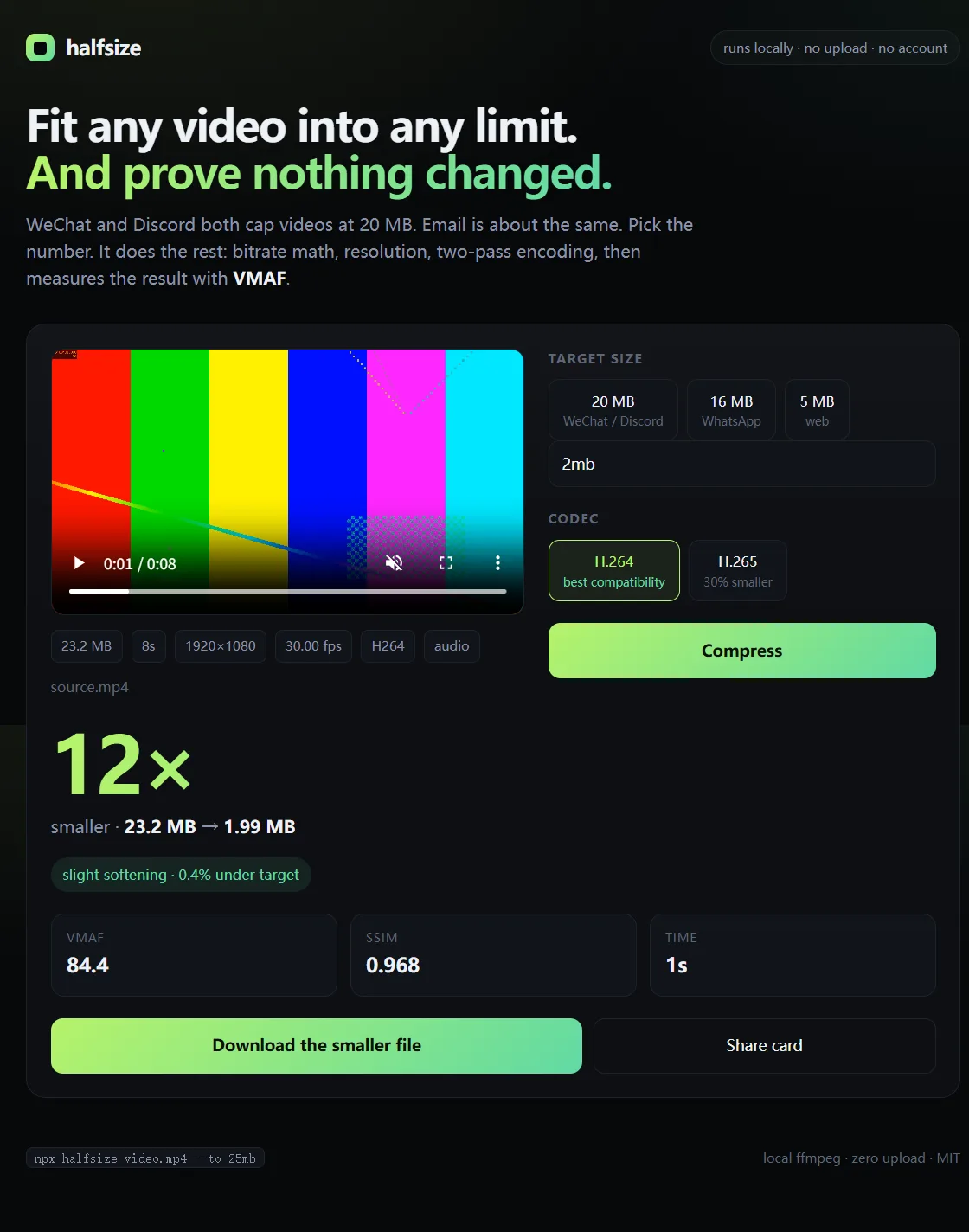
The UI is served from your machine. Nothing is uploaded.
What “exactly 20 MB” means
Video bitrate is variable, so the encoder cannot promise a byte count before it finishes. halfsize computes a bitrate budget from the target, subtracts audio and container overhead, and then checks the result. In practice it lands 1–3% under the cap, which is what you want: 19.45 MB is accepted everywhere, 20.01 MB is not.
If a portal rejects the file anyway, give yourself more margin:
$ npx halfsize video.mp4 --to 19mbWho has a 20 MB limit?
| Where | Limit | Command |
|---|---|---|
| Discord (free) | 20 MB | --for discord |
| WeChat chat video | 20 MB | --for wechat |
| WhatsApp media | 16 MB | --for whatsapp |
| Most email providers | 20–25 MB | --to 20mb |
| Generic upload forms | 20 MB | --to 20mb |
Limits change. When in doubt, target the number the form tells you, with a little margin.
Quality at 20 MB
A one-minute 1080p clip at 20 MB has about 2.4 Mbps for video after audio. That is enough for 720p to look good and not enough for 1080p to look its best, which is exactly why the tool downscales. Measured results on a 60 s 1080p30 18 Mbps source:
| Target | Output | Resolution | VMAF | Verdict |
|---|---|---|---|---|
| 20 MB | 19.45 MB | 1280×720 | 88.3 | slight softening |
| 16 MB | 15.59 MB | 960×540 | 84.8 | slight softening |
| 10 MB | 9.77 MB | 960×540 | 82.9 | slight softening |
VMAF is measured against the source at the midpoint; SSIM at three points. Above 90 reads as “looks the same”, 80–90 as “slight softening”, 70–80 as “visible loss”.
Longer video needs a lower resolution. A 10-minute clip at 20 MB has 0.25 Mbps. The tool will drop to 360p or 240p and report visible loss. That is not a bug; it is the arithmetic. Cut the clip if quality matters.
Useful flags
--to 20mb— the size you want. Acceptsmb,mib, or plain bytes.--for discord— platform shortcut for the current cap.--codec h265— around 30% more quality at the same size, at the cost of compatibility.--no-downscale— keep the source resolution, come what may.--crf 23— quality-first mode when size is not the constraint.--json— machine-readable result for scripts and CI.--dry-run— print the plan without encoding.
Batch several videos
$ npx halfsize intro.mp4 demo.mp4 ending.mp4 --to 20mb

  intro.mp4   →  intro.20mb.mp4    19.4 MB   VMAF 88.1
  demo.mp4    →  demo.20mb.mp4     19.6 MB   VMAF 86.7
  ending.mp4  →  ending.20mb.mp4   19.2 MB   VMAF 90.2
FAQ
Is it free?
Yes. MIT licensed, no paid tier, no watermark, no account.
Does it upload my file?
No. Everything runs locally. The only download is a static FFmpeg build during installation.
Why is the output smaller than 20 MB?
Container overhead and bitrate variance are hard to predict exactly, so the tool leaves a small safety margin. Use --to 20.4mb if you want to push closer.
Will the result still look good?
It prints VMAF and SSIM with a plain-language verdict. For a one-minute clip at 20 MB, the measured result was VMAF 88.3: slight softening, not a visible mess.
Can I do 1080p at 20 MB?
You can force it with --no-downscale, but 720p usually looks better at the same bitrate. Try --dry-run to see the plan first.
Does it work without Node.js?
The CLI is distributed through npm and needs Node.js 18+. FFmpeg itself is bundled automatically.